3 Steps To Learning The Basics Of Photography With A Virtual DSLR
Turn Your Steam Trading Cards Into What You Really Want
Lumen Color Changing LED Light Bulb Goes with Bluetooth, Not Wi-Fi
- Trampoline Bridge in Paris Would Make Crossing the River Fun Again
- 5 Things to Make Your Business Card Design Outstanding
- Stunning Tower Design – Summer Olympics 2016 Rio de Janeiro
- Car and Shoe Hybrid, photoshop-manipulations, FILA winter catalogue
- Creative Print Advertisements that use their surroundings …and others
Showing posts with label Articles | Artist Gallery. Show all posts
Monday, 13 January 2014
Artistic Gallery, Artistic Work, Artist Collections, Artistic Effect
Friday, 3 January 2014
Turn Your Steam Trading Cards Into What You Really Want
Back in June, Steam’s Trading Card system went live to the general public. You may have accumulated some cards in your inventory just by playing your favorite games, or buying new ones during Steam’s various seasonal sales. The system links select games with a collection of digital cards (usually 5 to 15 of them) which, if assembled as a set, can be exchanged for a badge, Steam experience points, profile backgrounds, and chat emotes. Even if you have no interest whatsoever in customizing your profile or bragging about your Steam level, you can offset your gaming expenses by selling your collection on Steam’s Market.
Well, you can if you play your cards right anyway. Read on to learn how trading cards work, and how you can use them to get what you really want.
Get Your Drops
To get into selling and trading cards, you’ll need to build up a healthy inventory so that you have the ones that other players want. Figure out which of your games offer card collections by hovering over your screen name in Steam, and scrolling down to Badges in the drop down. Any game with a badge had a card collection.
Then, see if you have any drops left in each of your games. If you do, it means you can earn more cards for that game just by leaving it running. You don’t even actually have to play the game in question if you don’t want to. Just boot it up and leave it running minimized until you’ve gotten all of your drops if you like.
Getting all your drops in a particular game makes you eligible for its randomly distributed booster packs, so each game you clear improves your chance of getting more cards for free. If you run out of games that drop trading cards, you can find the best deals on more with these resources.
Trade to Manage Your Inventory
Even if you collect all of your drops from every game you own, you might not have enough cards that people want. If that’s the case, you’re going to need to trade in a way that increases the size of your collection. The good news is, that’s not as hard as it sounds.
Many players aren’t going through the long game with their cards. They’ve decided which badges, backgrounds, and emoticons they want, and they’re all too happy to trade away cards that they won’t be using. This means you can trade with them at a favorable ratio if you have what they want.
Every game that has a badge also has a Trading sub-forum for its cards. It’ll be linked on the right side of that game’s Discussions page.
You’ll notice that the community has adopted a topic title pattern that makes it very easy to skim the forum and find the right trading partner. When you post a topic, [H] precedes cards you have for trade, and [W] comes before the ones you want. You don’t even have to name specific cards if you’re just trying to boost your stock. Something like, “[H] Garry’s Mod Cards [W] Any trade 1:2, 2:3, 3:4″ works if you want to say you’ll give up your Garry’s Mod cards at the listed ratios. You can always further clarify in the body of the post.
Any listing in the Trading forum will also have a link to the user’s Steam inventory. You can browse inventories even when they’re offline, and leave trade proposals for them to answer at their leisure. They’re free to accept, decline, or counter-propose until the two of you break things off or come to an agreement. Since it’s all done asynchronously by leaving offers, you never have to worry that you might interrupt someone mid-game, or be interrupted yourself.
Decide What You Want
Once you have a healthy library of cards, the next thing you need to do is decide what you want to get out of the Steam Trading Card system. There are essentially three things you can turn your cards into.
Profile Backgrounds and Emoticons
If this is you, you’re in luck. You’ll benefit from a buyer’s market on the vast majority of games, with all but the rarest profile backgrounds and emoticons going for ten cents or less. That’s about the same amount you can get for selling a single card from many games, so you’ll get what you’re looking for without the work of assembling complete sets. Just visit Steam’s Market (found under the Community drop down menu) and search items from your favorite games.
Steam Store Credit
There are lots of users trying to sell their trading cards off for a few cents each. Be prepared to be patient if you take this route. You’ll have lots of competition, and you’ll have to sell a large volume of cards to see any appreciable money. You’ll need to undercut the lowest seller when you post your cards to the market if you want them to move quickly. Make sure to pay attention to your inventory of cards, too. When you start getting low, go back to trading at favorable ratios (as described above) to rebuild your stock.
Badges That Raise Your Steam Level
Crafting badges to raise your Steam level has several benefits. It awards the backgrounds and emoticons previously mentioned, but that’s not all. It also increases the likelihood of getting random boosters for your eligible games, raises the cap on your friend list, and it gives you custom showcases to show off your favorite parts of your Steam profile. If you don’t care which badges you get, and only care about how high you can make your level, the favorable ratio trades (again, above) are your best tactic. The more cards you get, the more likely you are to complete sets, and you can always offer more equal trades to finish off near-complete sets. Rumor has it Valve is brainstorming even more perks for users with high Steam levels, so it never hurts to bump it up a little more.
Conclusion
It’s worth noting that if you really don’t want to make any effort with your trading cards to turn them into something else, they’re still more than just the little thumbnail image you see in your inventory. Head over to your Badge menu sometime and click the cards in your collection to see high resolution concept art and game images if you just want to enjoy them for what they are. After all, as with any collectible, the value is in the eye of the beholder.
Are you enjoying Steam’s trading card system, or do you ignore it entirely? Tell us what you think in the comments.
Are you more of a game collector than a card collector? Get more out of your extensive Steam library with Enhanced Steam and these other great tools.
Article by: Robert Wiesehan
3 Steps To Learning The Basics Of Photography With A Virtual DSLR
When you are eyeing the latest DSLR camera on the shop window, a virtual camera application isn’t going to draw your attention. But if that dream camera is still some dollars away, the Outside of Auto from Canon could be the thing to give you a gentler introduction to the basics of photography. The best way to learn photography is by taking thousands of pictures, but learning a bit of theory does bolster the practice. Rather than learning from books, tutorials, or YouTube videos, this web application from Canon Canada is the most fun yet.
Canon Outside of Auto is specific to the Japanese camera manufacturer. The skill of manually perfecting exposure is generic to all. Understand the exposure triangle and you are semi-primed for bigger things in photography. This camera simulator wants you to give the auto mode in your camera a rest – instead see how simple adjustments to shutter speed, aperture, and ISO can create beautiful photo effects.
The First Step to Understanding – Learn
The camera simulator starts with the section that introduces you to the fundamentals of aperture, shutter, ISO, and exposure. As you can see in the screenshot below, the terms are explained very simply and superbly illustrated with big visuals. You can use the visuals (with the settings shown with icons) as memory aids for remembering what is what. For instance, it takes a while for a beginner to grasp the f-stop number stepping. Early understanding of how aperture affects depth of field gives you the confidence to take crystal clear landscape shots and also subject-focused portraits.

Photography 101 is a simple guide that gives you the basic steps to follow for a shot. It may seem very simplistic, but it again stresses the importance on determining exposure by balancing the requirements of the photo. The usefulness of ambient light is also briefly explained. If you feel like going back to the basics at any time, hit the Glossary tab on the right which then takes over the browser screen with the definitions of the basic photography terms.

Tips and Tricks for getting the pictures you want is a short but useful collection of eleven photography nuggets that every photography beginner should drum into his or her head. For instance:
This is a mantra worth repeating for your initial photographs till you get the hang of it.
Putting the Learning into Practice with Play
This is the virtual camera simulator on Outside of Auto. Apply all that learning from the previous section and put them into use without actually going outside in the sun with an actual camera. The virtual camera has three creative shooting modes –Shutter Priority, Aperture Priority, and Manual.
You can use the sliders to change Aperture, Shutter Speed, and ISO. Check the Exposure Meter before you snap the model airplane. You can take as many shots as you want while experimenting with the graduated slider settings. There’s another little visual guide on the right which shows the effect of the sliders on Depth of Field, Motion, and Noise for respective changes in Aperture, Shutter Speed, and ISO. If you are confused about the right results, click the Examples tab on the left to see some sample shots.
The simulator gives you instant feedback on your shots and you can use it to fine tune your photos.
I guess it would have been more of a challenge if the ambient lighting was also customizable. It isn’t…but for some photography challenges, you can head to the next section.
The Challenge
The Challenge section is your test arena where you can put whatever you learnt in the last two sections against the clock. Six different scenarios are given and you have to meet challenges like “get a good exposure” or a challenge like the one in the screenshot. You can see how the target picture looks and even take the help of hints, but the clock ticks away in the background. The challenge is clearly designed to test your confidence level around the camera settings and how quickly you put them into practice. After you have taken a challenge, the hints are also useful to understand when and where to use the different creative shooting modes.
A Good Place to Begin
I hope old hands don’t scoff at this virtual camera. In the end, it is a learning tool and I think really useful for someone on the verge of buying a camera, or even someone learning the ropes on their own. The number of photo scenes is limited (to one), but the challenges really put you through the basics. Outside of Auto is meant to be simple; anything otherwise could easily overwhelm the photography beginner.
You can add Outside of Auto to the list of three online camera simulators we covered earlier. If you favor Nikon, look through the Lens Simulator as well. Finally, you shouldn’t miss our free Photography Guide if you are just starting out.
What do you think about Outside of Auto? Did you like clicking around with it? Share this nice learning tool with anyone who is interested in photography.
Article by: Saikat Basu
Friday, 20 December 2013
5 Things to Make Your Business Card Design Outstanding
By Marry Warner
We all have heard that first impressions count, and when meeting potential clients you need to make a good first impression. A great business card helps you do that. Business card design surely have changed with the times but their importance in branding and networking strategy is still pretty big. With so many marketing tools to choose from, the business card remains an effective one and cheap too!
Your image matters and business cards are really necessary to make a professional appearance.
1. Choose an Appropriate Card Style:
If you are working in a law firm, you don’t want a colorful business card with cheery graphics because your profession is a sober, serious one. You need to select a style for your business card that compliments your personal style, business and which will present a strong brand image to your clients.
When you start designing the card, first keep in mind the image you aim to project through this card. There are a number of styles you can consider to use. You can either keep it simple and basic by keeping it in black and white. Another style is to add graphics or a photograph. Some high-end businesses even use wood or metal for their business cards to give a different feel. Embossing, matte finishing, using high-quality paper or adding a lustrous shine to the card are various options available to give a great look to your card.
2. Ensure The Text Is Readable:
The font should be of appropriate size so that it is readable. If a card’s design is too busy, the jumble of words and graphics may make the text unreadable. Some font sizes may look alright on the computer but after you print them out, may appear to be too small.
3. Avoid Clutter:
In this age, fax numbers have been replaced by Facebook and LinkedIn profile links. What these people don’t realize is that by placing too much contact information you actually just clutter the card. Your name on the card and the design gets lost among too much clutter of info. And your card no longer looks powerful.
Some people even make the mistake of adding their personal e-mail addresses on the card. There is no need for it and sends the wrong message that you are not professional enough to have a separate e-mail address for your business.
4. Be Creative:
Think out of the box if you want to attract attention immediately. Some businesses go the extra mile when it comes to their card and don’t stick with the conventional card design and material.
They aim to be unique. And being different surely gets your brand noticed!
5. Include a QR Code:
In this age of technology, almost all our customers own a smartphone. A QR code is a barcode that helps your clients make a link between your physical business and your virtual one. This is a fun idea that not many businesses are using but makes for a great conversation starter and a start of a relationship. You can make or download a QR code online!
Always remember to hand out your business card when you meet a potential client! These pointers are great ways to make your business crowd stick out and grab clients’ attention for sure.
Monday, 18 November 2013
Lumen Color Changing LED Light Bulb Goes with Bluetooth, Not Wi-Fi
A couple of months ago, the LIFX LED lightbulb debuted on Kickstarter, and it was only a couple of weeks ago when electronics giant Philips unveiled its Hue color changing LED light bulb. These light bulbs not only allow you to choose whatever color you want using a smartphone application, they also allow you to turn the light on or off at pre-set times, making for built-in home automation. These bulbs require an in-home Wi-Fi connection and come with a special bridge you have to connect to your network. Now, a competing product has turned up on Indiegogo called the Lumen Bluetooth LED bulb.

Like the LIFX and the Hue, the Lumen bulb will use an app that controls the light brightness, color, and can turn the lights on or off. Inside the bulb, its RGBW LED array lets you create any color you desire, including pure white. However, the Lumen operates on Bluetooth instead of Wi-Fi. This lets you use the bulbs without an existing wireless network, but limits its range to 30 feet. This might be okay for apartment-dwellers, but it’s not so great if you live in a larger dwelling.

The bulb also has four special operating modes. The modes include Party Mode that flashes the light bulb and changes color to the music. Sleep Mode is designed to simulate moonlight. Lake mode helps you get out of bed in the mornings by waking you to gradually brightening light rather than the alarm. The Ambient Mode creates romantic soft and dim lighting.
An early-bird special will get you one Lumen bulb for $49(USD). Two bulbs will cost $99, 10 sell for $450, 25 cost $1000, and 100 of the bulbs will cost $3500. The project still has 30 days to raise the funding needed, and is seeking $110,000 in funding, and has so far scored only about $1300. If you prefer Bluetooth to Wi-Fi, head on over to Indiegogo and reserve yours now.
Like the LIFX and the Hue, the Lumen bulb will use an app that controls the light brightness, color, and can turn the lights on or off. Inside the bulb, its RGBW LED array lets you create any color you desire, including pure white. However, the Lumen operates on Bluetooth instead of Wi-Fi. This lets you use the bulbs without an existing wireless network, but limits its range to 30 feet. This might be okay for apartment-dwellers, but it’s not so great if you live in a larger dwelling.
The bulb also has four special operating modes. The modes include Party Mode that flashes the light bulb and changes color to the music. Sleep Mode is designed to simulate moonlight. Lake mode helps you get out of bed in the mornings by waking you to gradually brightening light rather than the alarm. The Ambient Mode creates romantic soft and dim lighting.
An early-bird special will get you one Lumen bulb for $49(USD). Two bulbs will cost $99, 10 sell for $450, 25 cost $1000, and 100 of the bulbs will cost $3500. The project still has 30 days to raise the funding needed, and is seeking $110,000 in funding, and has so far scored only about $1300. If you prefer Bluetooth to Wi-Fi, head on over to Indiegogo and reserve yours now.
Trampoline Bridge in Paris Would Make Crossing the River Fun Again
I’ve always had a fascination with bridges ever since I was a kid, all thanks to the rhyme that went ‘London bridge is falling down…’ Now that I think of it, it’s a sad rhyme and what does it have to do with the fair lady?
Anyway, that fascination wore off when I realized that bridges were just, you know, bridges. But I think this concept for a trampoline bridge in Paris (called ‘A Bridge in Paris’ – stating the obvious, I know) might have just brought the joy back to bridges!

Basically, the picture says it all. To let everyone experience the ‘joyful release from gravity’, the AZC Architecture Studio designed the bridge using three gigantic trampolines that would be connected with massive inflatable tubes.

Now that’s one bridge that I’d like to keep crossing all day long.

Of course, they don’t quite explain how they’d keep people from flying off the thing and landing in the River Seine.

Anyway, that fascination wore off when I realized that bridges were just, you know, bridges. But I think this concept for a trampoline bridge in Paris (called ‘A Bridge in Paris’ – stating the obvious, I know) might have just brought the joy back to bridges!
Basically, the picture says it all. To let everyone experience the ‘joyful release from gravity’, the AZC Architecture Studio designed the bridge using three gigantic trampolines that would be connected with massive inflatable tubes.
Now that’s one bridge that I’d like to keep crossing all day long.
Of course, they don’t quite explain how they’d keep people from flying off the thing and landing in the River Seine.
Sunday, 17 November 2013
Car and Shoe Hybrid, photoshop-manipulations, FILA winter catalogue
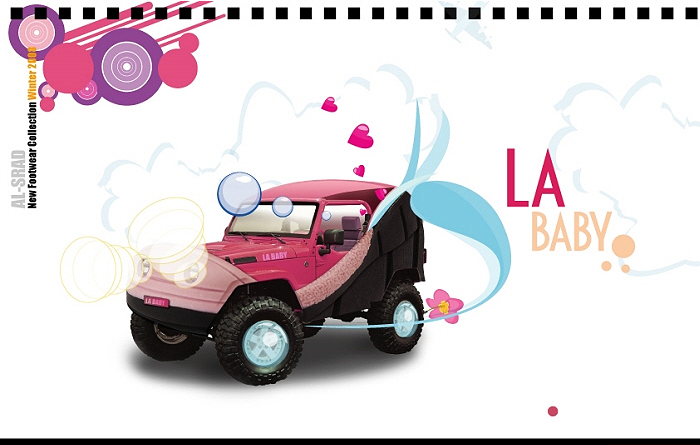
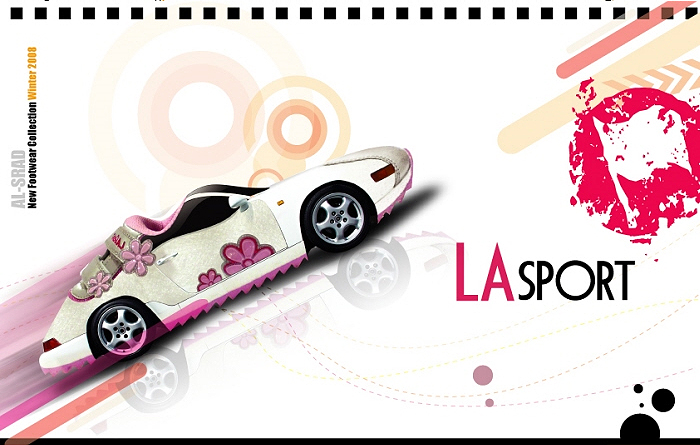
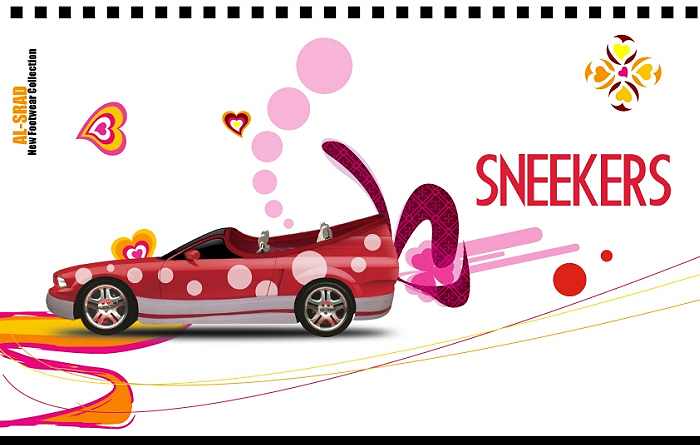
Below are several coverpage designs for a Winter Collection – FILA Shoe Catalogue . Alsrad is the official FILA contact in Israel. For each section we designed a gateway page playing on the similarities between cars and shoes – using photoshop to create nice photo manipulations of a car and shoe hybrid. Which gives the shoes an extra boost of power! It was a fun project and I give alot of the credit to my good friend Aviram Iluz, a very talented graphic artist who gave it flavor with his beautiful illustrations thorugh-out the catalogue. I am not displaying the whole thing, but you can see below a list of all the shoe manipulations with the a larger version – with more detail if you click on each.Catalogue Front
Catalogue Cover
Fila Boys
LA Gear (Baby)
British Knights
Fila (Characters)
LA Gear (sport)
Lotto (kids)
Lotto (sport)
Other
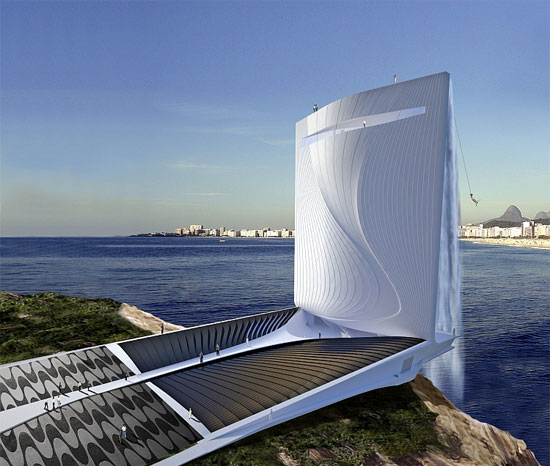
Stunning Tower Design – Summer Olympics 2016 Rio de Janeiro
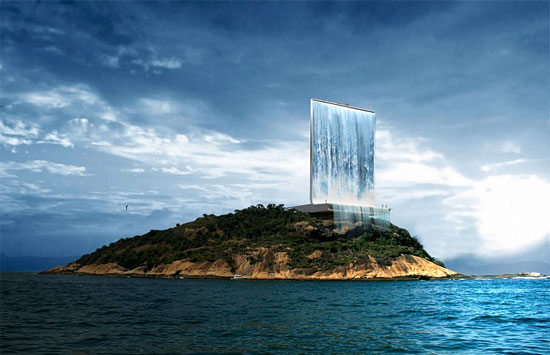
An innovative Solar Powered Water Fall – ” Solar City Tower”, located atop the island of Cotonduba is said to be the welcome symbol to the 2016 Olympic Games in Rio de Janeiro.
This 105 meter tower is meant to supply energy for all of the Olympic city, as well as also for part of Rio. It pumps up water from the ocean to create what appears like a water fall. This stimulates turbines that produce energy during the night. The Tower will consist of an amphitheater, an auditorium, a cafeteria, boutiques, and a top floor observation deck with a 360 degree breathtaking view of Rio. Oh, and for thrill seekers, they say there will be bungee jumping too!
Subscribe to:
Posts (Atom)